Publish from a project
After you've created a project to collect components and develop content, you can transform your Inspire content into a format your customers can use, such as PDF or HTML. If you've assigned profiling attributes to content, you can choose the filtering options to create documents that vary. You can also validate your XML before publishing or create a snapshot of the component as it exists at the time of publishing.
 An Inspire administrator can define at the user and role level whether the Publish action is available.
- By default, only administrators can publish content in Inspire.
- You can see the Publish option only if you're an administrator or have the can_publish module property.

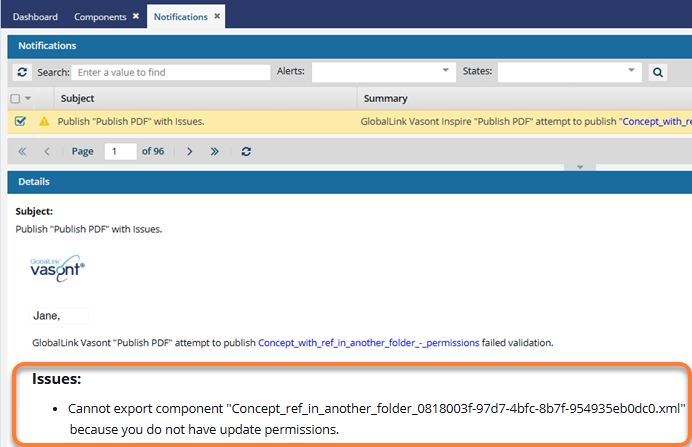
 If there are any components you don't have permission to publish, they are listed in a publishing notification. The components named in the Issues section are not published.
 Tips and tricks
- Other places where you can publish. Anywhere you can access a component, you can select the Publish option.
- Set notifications. If you have changed the defaults and want to see publishing notifications, make sure you configure them before publishing. Follow the steps in Set notification preferences for publishing.
- Use tokens in the job's Publish Name. When publishing a component or from a profile, you can use a token in the job Name to pull in data so that you don't have to type it in every time you send the component out for publishing.
- You can use characters reserved for XPath and system variables in Publish Name.
- To add a token when publishing a component, follow the steps in Publish a component with tokens.
- To add a token to a publishing profile, follow the steps in Publish from a profile with tokens.
- You can use characters reserved for XPath and system variables in Publish Name.
- Automatically reuse publishing settings. To streamline repeat publishing tasks, Inspire can now remember publishing settings on a per-component basis without a publishing profile. When a component is published, the settings you use are saved and automatically reused the next time you publish that same component.
- An administrator must enable the Remember Publishing Settings By Component feature. Admins can follow the steps in: Remember publishing settings.
- Opening the Publish dialog for a component restores the settings used during its most recent publication.
- Do not select anything in Publish Configuration when this feature is enabled. If you do, publishing settings are not remembered.
- Other users can modify the publishing settings at any time, and the updated choices will be saved for future publications of that component.
- Settings are NOT saved on a per-user basis.
 For a more permanent collection of settings that other users can't modify, you can create a publishing profile. Follow the steps in: Work with publishing profiles.
- Read the Publishing Frequently Asked Questions (FAQs). For more information on publishing your content, read Publishing FAQs.