Remember publishing settings
To reduce repetitive setup, improve consistency across publishing cycles, and make it faster to republish components using previously selected options, you can enable the Remember Publishing Settings By Component feature.
 Tips and tricks
- By default, RememberPublishingSettingsByComponent is set to false.
- If you set this feature to true:
- Opening the Publish dialog for a component restores the settings used during its most recent publication.
The following settings are retained: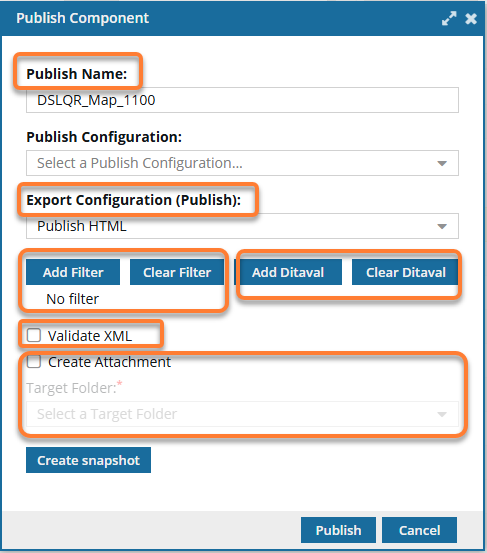
- Publish Name
- Export Configuration (Publish)
- Selected Filters
- Selected Ditaval
- Validate XML option
- Create Attachment option and Target Folder
 It is recommended that you discourage users from selecting anything in Publish Configuration when this feature is enabled. If they do, publishing settings are not remembered.
- Other users can modify the publishing settings at any time, and the updated choices will be saved for future publications of that component.
 For a more permanent collection of settings that other users can't modify, you can create a publishing profile. Follow the steps in: Work with publishing profiles.
- Opening the Publish dialog for a component restores the settings used during its most recent publication.

To automatically reuse publishing settings:
-
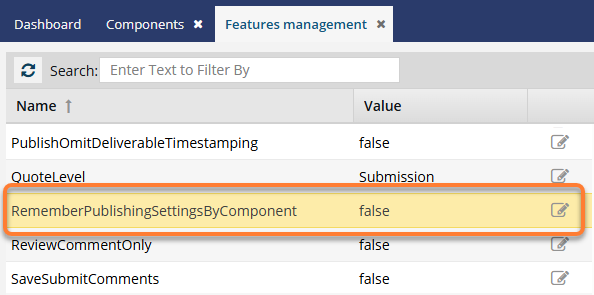
On the Features Management tab, after RememberPublishingSettingsByComponent, click
 Update.
-
The current value is displayed in a blue text box. To enable the feature:

-
Click Update.
 Results:
 - Your changes are saved.
- When a component is published, the settings used are saved and automatically reused the next time that same component is published. Settings are NOT saved on a per-user basis.
 Users must log out and back in to see the changes.
-
Click Update.