Manage schema standards
Inspire provides a basic XML validation framework, but you can also specify a custom schema. If you do, and the schema version is not provided by Inspire, you must add it.

 Tips and tricks
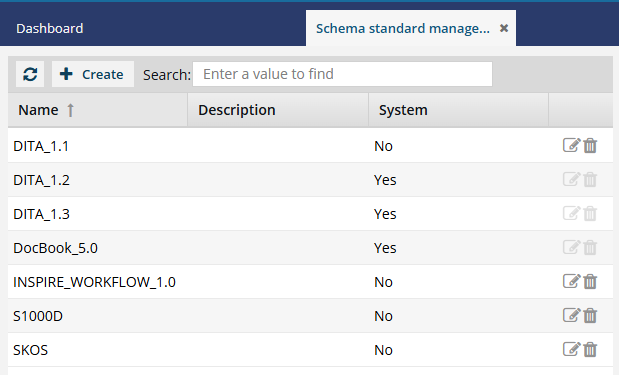
- Inspire provides a definition of the following schema standards:
- DITA 1.2
- DITA 1.3
- DocBook 5.0
- These schema standards are considered system standards and cannot be updated or removed.
 Topics in this article:
- What is a schema standard?
- Where does Inspire use schema standards?
- How does Inspire use schema frameworks?
 Ready to get started?
What is a schema standard?
An XML Schema standard is a formal specification that defines the structure, content, and data types that are allowed in an XML document.

The most widely used standard is XML Schema Definition (XSD), published by the World Wide Web Consortium (W3C). An XSD allows organizations to define rules that XML documents must follow and to validate whether an XML document is valid against those rules.
An XML Schema can specify:
- Which elements are allowed
- Which attributes are allowed
- The order of elements
- Whether elements are required or optional
- Data types (string, integer, date, boolean, etc.)
- Restrictions such as length, range, or patterns for values
Where does Inspire use schema standards?
A schema ensures data consistency between systems and detects invalid XML before processing. Inspire uses a schema as a contract for data exchange with other applications it supports.
To provide strong data typing and validation, Inspire uses a schema standard in the following places:
- Integrations
- Web services (SOAP)
- Configurations
- Component schema management
- Oxygen validation
How does Inspire use schema frameworks?
How Inspire uses schema frameworks:
- Inspire provides a basic XML framework.
- Optionally, you can store a custom framework in Inspire.
- To use the framework, when you're storing it in Inspire, you must select the Active option.
- You must ensure all Active frameworks have a valid framework zip file attached.
- You can Create a component type configuration for different structures in your custom schema.
- Inspire uses component type configurations when you import documents into the system.
- When you want to work in the Oxygen-based editor, before starting the Oxygen editor, Inspire downloads all frameworks marked as Active.
- In the Oxygen editor, during automatic and manual validations, warnings and errors are reported if the XML markup breaks the rules defined in the Active schema that is associated with the component type's public identifier.
 All schemas marked as Active can be used for validation at the same time. Using more than one customized framework at once allows you to choose which framework to use at the component level without constantly managing schema activation. Inspire knows which framework to use when validating a component by looking in the component type's configuration in the public identifier field.
- To set the component type's public identifier, read Configure component types.
- For example, if you have a different framework for each genre of book you publish, you would:
- Save each schema framework in Inspire (Create a custom schema).
- FictionBook schema
- NonFictionBook schema
- YouthBook schema
- Create a component type configuration for each structure in each schema.
- For the FictionBook schema, you can create a component type configuration called "Fiction Topic" with a public identifier of FictionBook.
- For the NonFictionBook schema, you can create a component type configuration called "Non-Fiction Topic" with a public identifier of NonFictionBook.
- For the YouthBook schema, you can create a component type configuration called "Youth Topic" with a public identifier of YouthBook.
- Let authors know which topic types to use:
- Authors writing a fiction book would create content in a "Fiction Topic". Using the public identifier, Inspire knows to validate a "Fiction Topic" with the FictionBook schema.
- Authors writing a non-fiction book would create content in a "Non-Fiction Topic". Using the public identifier, Inspire knows to validate a "Non-Fiction Topic" with the NonFictionBook schema.
- Authors writing a children's book would create content in a "Youth Topic". Using the public identifier, Inspire knows to validate a "Youth Topic" with the YouthBook schema.
- Authors writing a historical fiction book that is both fiction and non-fiction could create content in a generic "DITA-Topic" using a public identifier of Oasis. This is a default framework that Inspire provides.
- Save each schema framework in Inspire (Create a custom schema).
 For more help:
- To see how authors validate XML components in the Oxygen editor: