Set the translation quote level
For clarity, leverage, and control over a translation job, you can request a quote. Setting the quote level not only lets you specify how the quote cost is calculated, it is required if you're also using quotes in GlobalLink Enterprise. You must set the Quote Level in Inspire to match what you've set for the translation project in GlobalLink Enterprise.
 Requirements
- Enable the use of quotes in Inspire.
 Enable quotes for translation projects
 - Match your GlobalLink Enterprise translation project settings. Find GlobalLink Enterprise translation quote settings

 Tips and tricks
- By default, QuotesLevel is to Batch.
- In the translation and localization world, quotes can include the following types of work items:
- Leverage. This type of item refers to any portion of text that does not need to be translated from scratch because it can be reused from previous work. Leverage can be full, partial, or repeated.
- Full. Segments that match 100% with the Translation Memory are considered full leverage because they can be reused as-is.
- Partial. If a segment is similar but not identical, it becomes a fuzzy match (e.g., 75–99% match). These are partial leverage items because the translator only needs to edit, not translate from scratch.
- Repeated. If your document repeats phrases or sentences, those repetitions are also leverage items. Vendors typically charge less for repeated segments.
- Line. This type of item refers to any portion of text that needs to be translated from scratch because it did not appear in any previous work.
- Leverage. This type of item refers to any portion of text that does not need to be translated from scratch because it can be reused from previous work. Leverage can be full, partial, or repeated.
- Quotes can help you understand the true cost before committing to work, compare vendors objectively, and get visibility into your content. Quote levels help you identify what level of work goes into a vendor's cost estimate.
- It is recommended that you use one of the following standard GlobalLink Enterprise quote levels:
- Batch (Default value). Leverage items and line items are both calculated per language batch.
- Language. Leverage items are calculated per language (the sum of all batches per item level), and line items are calculated per language.
- Submission. Leverage items are calculated per language (the sum of all batches per item level), and line items are calculated on the submission level.
 Inspire allows an administrator to use any value in Quote Level. After a translation coordinator requests a quote, if the value in Inspire does not correspond to your translation project in GlobalLink Enterprise, the translation coordinator sees a message that "The GL project quote level does not match the user's feature settings." In this case the translation quote fails to be created.
To set the quote level for translation jobs:
-
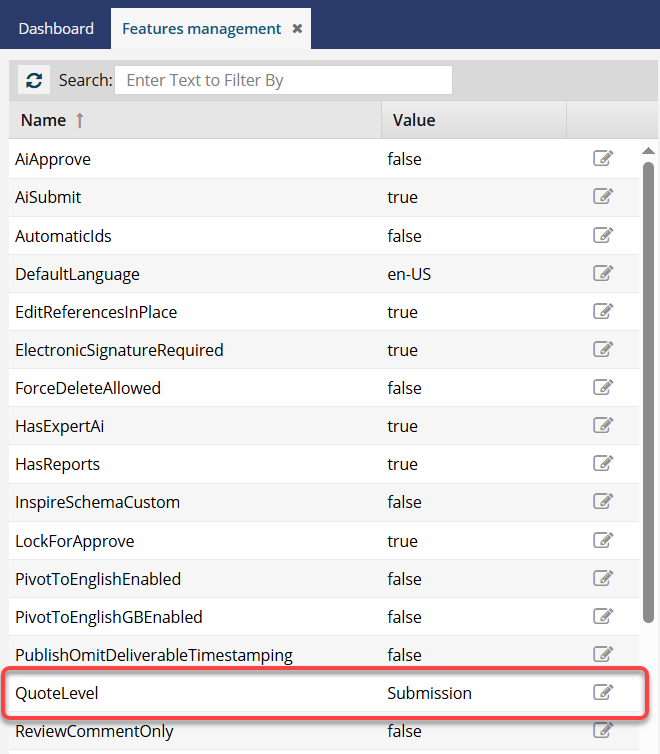
On the Features Management tab, after QuoteLevel, click
 Update.
-
The current level is displayed in a blue text box. To change the level:

-
Enter a value that matches what is used in the translation project in GlobalLink Enterprise.
Inspire allows an administrator to use any value in Quote Level. After a translation coordinator creates a translation job, if the value does not correspond to your translation project in GlobalLink Enterprise, the translation coordinator sees a message that "The GL project quote level does not match the user's feature settings." In this case the translation job fails to be created.
It is recommended that you use one of the following standard GlobalLink Enterprise quote levels:
- Batch (Leverage items and line items are both calculated per language batch.)
- Language (Leverage items are calculated per language -the sum of all batches per item level- and line items are calculated per language.)
- Submission (Leverage items are calculated per language -the sum of all batches per item level- and line items are calculated on the submission level.)
-
Click Update.
 Results:
 - Your changes are saved.
- When new translation jobs are queued and sent for a quote, the vendor receives a request to calculate the cost of work based on the Quote level you set.
- Translation coordinators cannot change this setting when creating a translation job or requesting a quote.
Users must log out and back in to see the changes.
-
Enter a value that matches what is used in the translation project in GlobalLink Enterprise.