Find GlobalLink Enterprise translation quote settings
You must enable quotes and set the quote level in Inspire to match what you've set for the translation project in GlobalLink Enterprise. If you aren't sure how your translation projects are configured in GlobalLink Enterprise, you can follow these steps.

If you have access to GlobalLink Knowledge, you can access all of the GlobalLink Enterprise help documentation.

To find GlobalLink Enterprise translation quote settings:
-
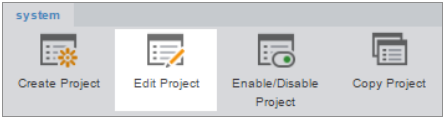
In the Projects folder, select the translation project you want to edit, then click Edit Project.
-
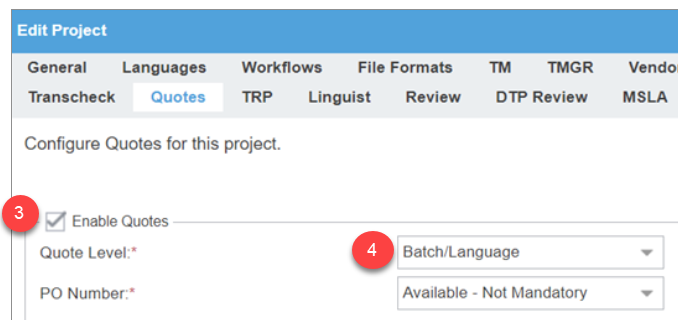
Ensure that Enable Quotes is selected.
-
See the value in Quote Level:
- Batch/Language—Leverage items and line items are both calculated per language batch.
- Language—Leverage items are calculated per language (the sum of all batches per item level), and line items are calculated per language.
- Submission—Leverage items are calculated per language (the sum of all batches per item level), and line items are calculated on the submission level.
 Quote level and the claim level of a submission are not tied together, and the claim level is configured by the administrator. By default, the claim level is language.
 -
If you made any changes, click OK.
 Results: Your quote configuration for the selected project is saved.