Accept or reject review changes
After all users mark their individual reviews Completed, the review moves to a state of Resolving. At this point, as the review coordinator, you must accept or reject all changes in all components in the review.
 Tips and tricks
- If the number of available reviews is large:
- Search for a review
- Sort the list of reviews
- Use the page navigation options at the bottom of the list
- For each component, you can review each change individually or accept or reject all changes at once.
- Whenever you accept or reject a change, you have the option of providing a reason. If you accept or reject all changes at once, you can only provide one reason.

To accept or reject review changes:
-
Click
 Reviews.
-
Right-click the review's row, and then select Open Review.
 You can also access this option by clicking
  the Options menu and selecting Open Review.
 -
In the Review Components pane, click the name of a component.
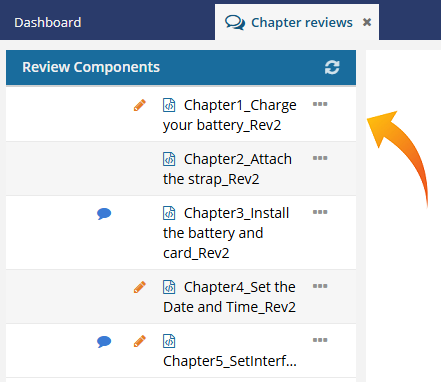 When resolving a review, you can quickly see which components include changes:
- Tracked changes
 . The coordinator must review the edits and either accept or delete them.
 - Comments
 . The coordinator can reply to a comment, however all comments must be removed before the review can be resolved.
 - To see the number of comments or changes, hover over an icon.
- The icons only track changes and comments made during the Reviewing phase. If comments and track changes were added to the component before the Review started, they will not cause the icon to display or be included in the icon's number.
- Tracked changes
-
In the editor's Review panel on the right side, each change is listed in a separate box for you to review.

-
When working with comments in the Review panel, use the icons to find changes:
- Deleted text is marked with a red minus sign
 .
. - New text is marked with a green plus sign
 .
. - Comments can also appear in this list, and are marked with a small comment bubble
 .
.
- Deleted text is marked with a red minus sign
-
To accept all changes at once, at the bottom of the Review panel, click the double green arrow
 .
.
- On the Reason dialog, to optionally provide acceptance details, enter text and then click OK.
- On the Reason dialog, to provide no acceptance details, click Cancel.
-
To reject all changes at once, at the bottom of the Review panel, click the double red arrow
 .
.
- On the Reason dialog, to optionally provide acceptance details, enter text and then click OK.
- On the Reason dialog, to provide no acceptance details, click Cancel.
-
To accept one change, in the Review panel, click the change. The box turns blue, and you'll see a menu of options at the bottom of the box.
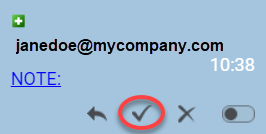
- Click the gray check mark.
- On the Reason dialog, to optionally provide acceptance details, enter text and then click OK.
- On the Reason dialog, to provide no acceptance details, click Cancel.
-
To reject one change, in the Review panel, click the change. The box turns blue, and you'll see a menu of options at the bottom of the box.
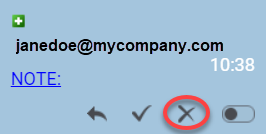
- Click the gray check mark.
- On the Reason dialog, to optionally provide rejection details, enter text and then click OK.
- On the Reason dialog, to provide no rejection details, click Cancel.
-
When all changes have been accepted or rejected, click Save
 .
.
-
Repeat steps 4 through 10 for all components in the review.
 When you finish resolving changes to the text, you must also:
- Remove all comments in the review.
- You can also optionally Edit or delete review discussions.
- When there are no more pending changes in the components you can mark the entire review as Completed.