Use the Oxygen AI Assistant
Inspire provides a way to create an AI-powered search for use in the Oxygen editor. This search can be used to help authors develop content.
 To access this premium feature, you must purchase it separately. Contact your Vasont customer representative to invest in efficiency and discover how AI can elevate your search experience today!

Access the AI Assistant
If your organization purchases the AI premium feature, and an administrator creates the AI Submit index:
- When you open a component in the Oxygen editor, you see the
 AI Assistant option in the right panel.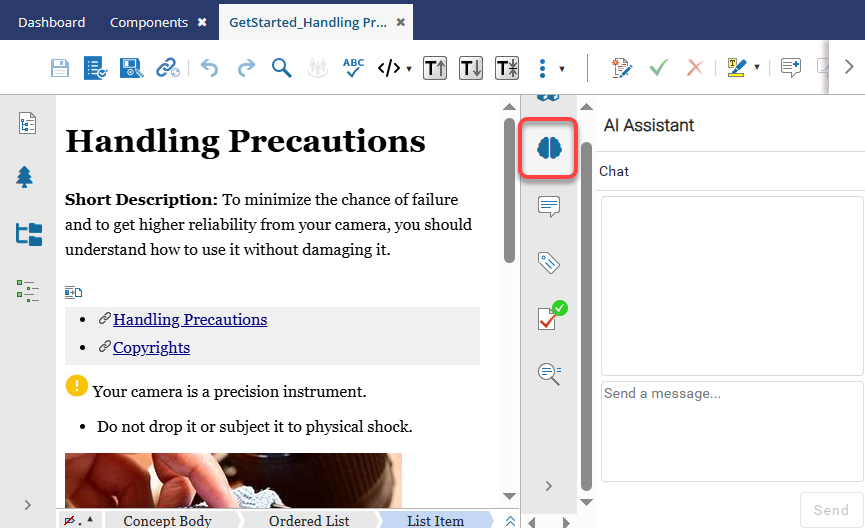
- Select the AI Assistant option to open the Chat pane.
- Ask a question about content that has been added to the index.
 To work with and send prompts:
- Press the Ctrl + Enter keys to send the prompt to the AI Assistant.
- Press the Enter key to add another line to the prompt without sending it.
- Click the Send button to send the prompt to the AI Assistant.
You can select additional AI Assistant options besides Chat.
- Summarize
- Find elements
- Find topics
For more information, read:
- Find content in the Oxygen AI Assistant pane
- Insert content from the Oxygen AI Assistant pane
- Copy content from the Oxygen AI Assistant pane
How content is automatically added to the AI search
 Currently, images are not supported in an AI index.
After an administrator creates the AI Submit index, Inspire users can add data to it and build up the content for an AI-powered search.
- If enabled, Inspire adds content to the AI Submit index automatically.
- This happens every time you edit a component in Oxygen and
 Save and Submit your changes.
 - Your changes overwrite content previously stored and allows the content to be updated automatically.
- You can also manually update content in the AI index from the Selected Component panel. Both administrators and non-administrators can add components to an index.