Manage workflow transitions in a template
You use transitions to identify what should happen when a workflow Activity is completed. For example, after a technical review, you can create a transition that specifies the files should go to an editor for review.
 Inspire workflow templates are designed around an Activity.
- Activities are connected by transitions.

The transition boxes normally start with a verb (an action word) such as Make, Send, Decline.

- Transitions tell Inspire what to do when an Activity is completed.
- You must have at least one starting Activity to create a Transition.
- You can have multiple transitions that occur after an activity.
- You can't drag-and-drop arrows to move a transition. You must update the From and To Activity.
- A transition can be created for an action that progresses the workflow, such as Approve.
- A transition can also be created for an action that returns the workflow to a previous step, such as Decline approval.
- If you remove an activity that a Transition is linked to, the transition box is highlighted in red.
- If there is also an Action that needs to be done during the transition, such as Take a snapshot, you can create the Action and add it to the Transition. Follow the steps in: Manage actions in a template.

 You must have permission to work with workflow templates.
- By default, only users with the following permissions can create project workflows and assignments:
- Administrator permissions
- Access to the Project Module with the Create permission
- Even if you don't have these permissions, you can be granted a special permission to create workflows and project assignments after a project is created.
- If you are an administrator, refer to Allow users to create project assignments and workflows.
- Users must be project Participants to start a project workflow.
- The Create Review activity must be assigned to a workgroup of users who are review coordinators.
- The Reviewing activity must be assigned to a workgroup of users who have reviewing permissions.
 Before you begin
- You can create multiple transitions for one activity if that activity has the Create multiple transitions option selected.
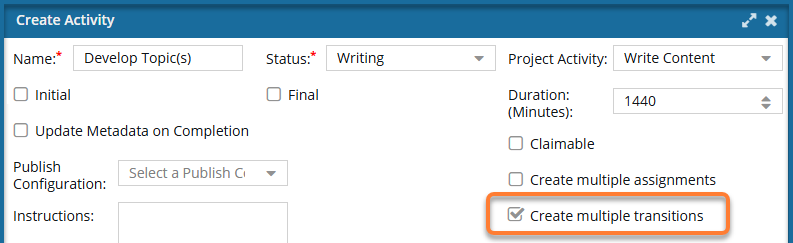
 If a connected Activity allows multiple transitions, you must select a Transition Type when creating or updating a transition.
- If Transition Type is available, select how you want to use this transition to move the workflow in a new direction, such as on an Accept path or Reject path. For more information on Transition Types, read: Using multiple transitions in a workflow.
- If Transition Type is not available (grayed out), then the From Activity does not have the Create Multiple Transitions option selected, and you can ignore this option.
- The changes to a Transition will be applied to all new workflows that are started using this template.
- For workflows that use this template and are in progress:
- If the Transition you are updating has not occurred yet, the changes will be applied when the workflow moves to the updated Transition.
- If the Transition you are updating has already been completed, the changes will not be applied.