Exclude multiple components from approval
You can let other Inspire users know if a component is in a state of completion by giving it an approved state. When approving components or choosing which references in the source component to approve, you can prevent components from being included in the approval process by attaching a specific tag.
 Restrictions
- You must have Update permissions to the component to make tag changes. Tags are read-only for users without update permissions.
- A content owner or administrator can set permissions to deny access to components or folders.

 Tips and tricks
- The tag that tells Inspire not to include a component in the approval process is called ApprovalNotRequired.
- You can use this tag on binary components such as an image or PDF file.
- Other ways you can apply the tag:
- To a single component in the Components browser
 Exclude one component from approval in the Components browser
 - In a project, to a single component
- In a project, to a multiple components
- To a single component in the Components browser
To exclude multiple components from being approved:
-
Click
 Components.
-
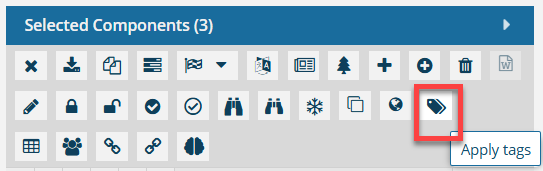
On the Selected Components pane, select
 Apply tags.
-
On the Update tags screen, select one of the following options:
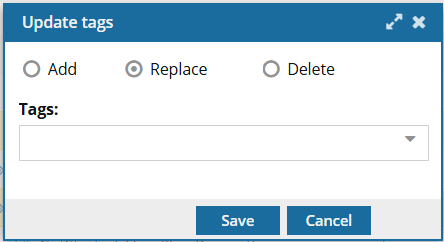
- Add. If you select this option, all previously existing tags are saved, and the ApprovalNotRequired tag is added to them.
 If the ApprovalNotRequired tag is already applied and you select Add, you don't see an error and no change is made to the metadata.
 - Replace. (This is the default selection.) If you select this option, all previously existing tags are removed and the ApprovalNotRequired tag is the only one applied to the components.
- Add. If you select this option, all previously existing tags are saved, and the ApprovalNotRequired tag is added to them.
-
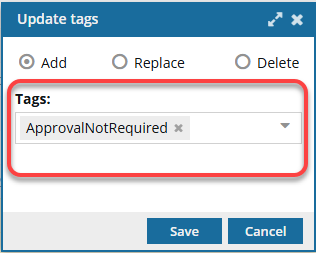
In Tags, select ApprovalNotRequired.
-
Click Save.
 Results:
- The Update tags screen closes and you see the Components browser.
You see something similar to the following notifications:
 When the process is finished, you may see one message for all updated components, depending on how you configured your notification settings:
- In the pop-up message in the right corner of the Inspire screen.
- In Inspire on the Notifications tab.
- In your email Inbox
 After you apply a tag, you must
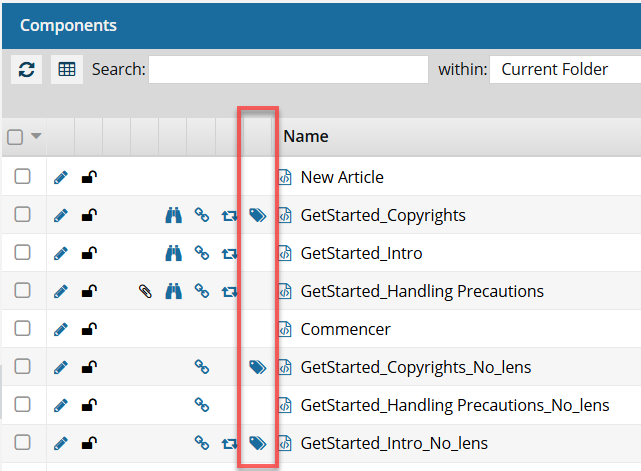
  refresh the Components browser before the tag is displayed.You see the component marked with
 the tag icon in the Components browser.
 Tips and tricks
- Look in the 8th column after
 the initial checkbox.
 - If it exists, the tag icon appears after
 (the Shared icon) and before
  or
or  (the file type icon).
 - To see the name of all tags that are applied, hover your cursor over the tag icon.