Add a reference to an empty topic using Oxygen
You can add an empty reference to a map that doesn't point to any topic that exists. This is useful if you want to add references to topics that you know you need but don't want to created yet. To resolve an empty topic reference (placeholders) and form a map that's valid, you either need to go back and specify a topic or delete the empty reference.
 Tips and tricks
If you want to resolve an empty reference, before using the steps in this topic make sure you've completed the following:
- If you haven't added a placeholder in your map yet, follow the instructions in Add an empty topic in a map using Oxygen.
- In the components browser, Create a component that you want to reference.
The instructions in this topic explain how to copy the exact Filename of the topic you want to add to the map's empty reference. Then you can paste the value in when you edit the empty element.

To add a reference to an empty topic using Oxygen:
-
Click
 Components.
-
On the Components pane, right-click the map component and then select Edit ...
You can also open the map by:
- Double-clicking
- Clicking
 the Options menu, and then selecting Edit ...
-
To the left of the editing pane, use the open slider button
 to open the Outline panel if it's not already open.
-
In the Outline pane, edit the reference by right-clicking the empty Topic Reference and selecting
 Edit Attributes.
Note: You can also add an attribute by:
Edit Attributes.
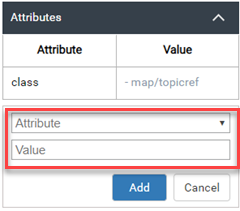
Note: You can also add an attribute by:- In the Outline pane, click the empty Topic Reference to select it.
- Open the Attributes panel if it's not already open using the slider button.
- In the Attributes panel, click Add Attribute.
-
On the Attributes panel, in Attribute, click the down arrow
 and scroll to select href. You can also type href to find it.
-
In Value, to paste in the Filename, press Ctrl+V.
Note: In Value, you can also select a Filename using the down arrow and scrolling. However, if you have a lot of topics, you may not be able to find the topic quickly.
-
To save your changes and close the map, in the toolbar, click the Save and submit icon
 .
.