Update a language definition
As an Inspire administrator, you can define the languages you need to develop content in and to use for translation projects. You can update the language definitions that Inspire provides instead of creating your own, or you can update language definitions you've created. These languages aren't used as system languages, so they won't change how text is displayed in the XML editor, menus, dialog boxes, or error messages in Inspire.
 Tips and tricks
Use language groups to save time
When you create a translation job, you can select a single language, or choose just the ones you need.
- If you consistently need to select the same languages, you can group those languages together.
- This allows you to save time by having a group of languages to choose when you send a component to translation.
Before you can select a language group in the following steps, you'll need to create them. Follow the steps in Group translation languages.

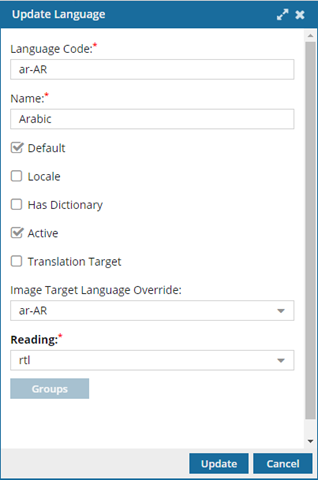
 Regardless of whether you're updating a language definition created by Inspire or a new language definition you created, you can't update the Language Code.
- You can only enter the Language Code when you're creating a new language definition.
- After you save a new language definition, you can't update the Language Code but you can update the Name.
- If you need to change the Language Code, you can delete the language definition and create a new one.
To update a language definition:
-
Click
 Administration, and then select Language management.
-
From the list of languages, select the one you want to update, and then click the update icon
 .
.
-
Anytime a language is being selected by a user, you can display this language first in the list. To identify this language as the one most commonly used, select the Default checkbox.
 If you set more than one system language as the default, Inspire uses the first language listed alphabetically.
 -
If there is a user interface designed specifically for this language, select the Locale checkbox.
Currently Inspire only supports a Locale for English and Spanish system languages. For other languages, don't select the Locale checkbox.
-
If Inspire loads a spelling dictionary for the system language, select the Has Dictionary checkbox.
Currently Inspire doesn't support loading custom spelling dictionaries for system languages. We recommend you don't select the Has dictionary checkbox. Inspire does load spelling dictionaries for English and Spanish languages. For other languages, we recommend you don't select the Has dictionary checkbox.
-
In Reading, select the direction used to read the text. For example, if the language is English, the reader starts with words on the left side of the page and moves to the right to read a sentence, so you would choose Ltr.
Notes
- The default direction in Reading is set to Ltr (Left-to-right).
- Inspire uses the Reading direction when creating target components for translation.