Validate XML components from a project
You can easily check XML components to validate content against the schema associated with the component. This helps you see errors if validation fails.
 Before you begin
- A content owner or administrator can set permissions to deny access to components or folders. If your permissions to content have been blocked, and you are not an administrator, you cannot use the Validate XML option in a project's Content pane.
- You can't validate binary (image files) and workflow components.
- If you are using components that are not DITA or DocBook, an administrator must provide a way for Inspire to find the Schema Name. Administrators can follow the steps in: Manage XML validation schemas in Inspire.

To validate XML components from a project:
-
Click
 Projects.
-
On the Project Management tab, all projects in your organization are listed.
 To find a specific project, you can:
 - Filter the list of available projects by words in the project name. In the Search text box, enter a keyword, and then click the magnifying glass
 .
. - Filter the list of available projects to include only those you own or are participating in. In Type, select an option to filter the list by that criterion.
- To include completed projects in the list, select Include Completed and then click the magnifying glass .
- Filter the list of available projects by words in the project name. In the Search text box, enter a keyword, and then click the magnifying glass
-
To open project details, select the project and double-click it.
You can also open a project by:
- Right-clicking the project and then selecting Open.
- Clicking
 the Options menu and then selecting Open.
-
In the Contents pane, to expand all topics, click
 .
.
-
In the Contents pane, select the component that you want to validate.
To see the complete name of the components and use advanced search to search through all folders within a project, click
 the Select Project Components option.
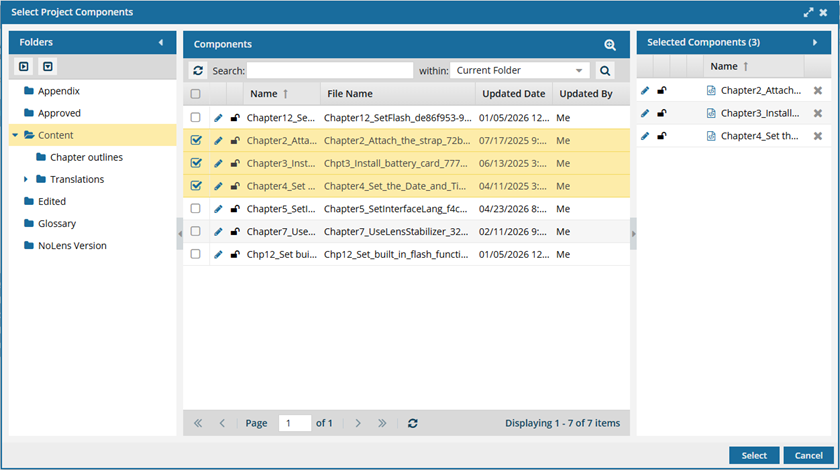
- To see more text in the Components pane, collapse the Folders panel by clicking
 the arrow that's pointing left.
- To quickly expand or collapse the folders, use the expand all and
 collapse all buttons.
- To find a component by keyword, in Search, enter words or phrases used in the component's name. In Within, select where in the project you want to search (Current Folder, Current and Subfolders, All Folders). Click Search .
- To find a component by creating a query, click
 Advanced Search.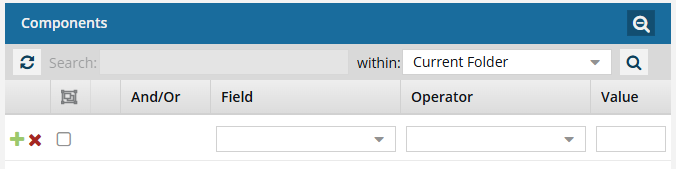
- Fields correspond to the columns in the grid. In the Field list, select the column you want to search in, such as Component State.
- After you select a Field, you must describe the relationship it has with the Value. In the Operator list, to include or exclude some or all of the values that you want to use, select an operator, such as
<>(not equal to). - The options in the Value list change depending on what you selected in Field. In the Value, select or enter the word, phrase, or number you are searching for in relation to the Field. For example, Component State (Field)
<>(Operator) Invalid (Value). - In Within, select where in the project you want to search (Current Folder, Current and Subfolders, All Folders).
- Optionally, to enter another clause to your query, click
 Add. Select whether you want to narrow your search by requiring that all statements must be true (And), or expand your search by requiring that any of the statements can be true (Or).
 - Click Search .
- To select multiple components to manage, select the checkbox for each component.
 Result: The components are listed on the Selected Components panel.
 - To close the Select Project Components screen, click Select.
- To see more text in the Components pane, collapse the Folders panel by clicking
-
In the component's row, click the Options menu, select Actions, and then select Validate XML.
 The Validate XML action menu is disabled for binary and workflow components. If at least one Validation Configuration exists, you are prompted to choose which set of rules or standards you want to use.
- Select a DITA standard or Schematron rule from the list.
- Click Validate.
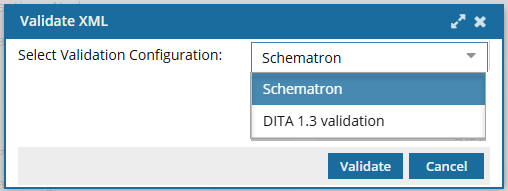 If you are not prompted to select a standard or set of rules, Inspire uses the Active schemas that your administrator has configured. Results: Component validation completes.
- If there are no validation errors, you see a message notifying you.
- If there are validation errors, a message displays a list of the validation errors for the component.