Understand the SFTP translation process
As a translation coordinator, you can create a translation job where the target files are securely uploaded to an FTP server for vendors to work on. If your administrator configures Inspire to use the SSH File Transfer Protocol (SFTP) to encrypt all data and commands, you will see the server described as SFTP instead of just FTP.

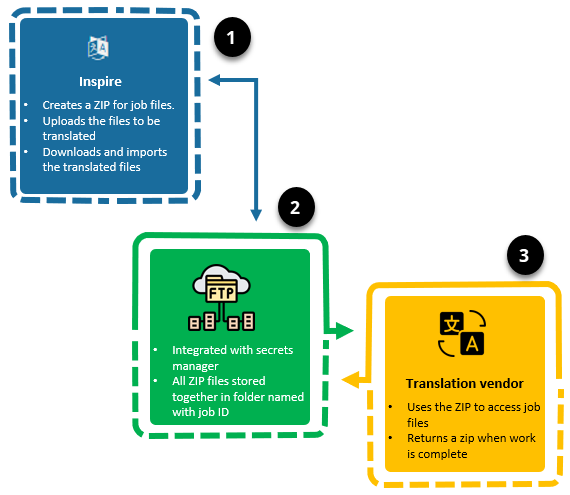
 After you create a translation job that uses the SFTP integration method, Inspire securely uploads the job as a ZIP file to a specified site by encrypting all data and commands.
 Inspire uses a job number in all SFTP requests.
- This ensures that if there are multiple ZIP files they are grouped together.
- The ZIP files are saved to a folder on the FTP server where the folder's name is the job number.
- No sensitive information is included in the requests.
 Important notes:
- Inspire only supports sending and receiving translation files as a ZIP with the SFTP integration method.
- If you immediately cancel the translation job before it gets processed, then Inspire does not send any files to the SFTP Server.
 After the SFTP server notifies Inspire that all the ZIP files are uploaded, Inspire changes the job's Status to In Progress.
You can send the ZIP file to your translation vendor from the FTP site or your vendor can access it there.
If a submission attempt fails, Inspire will try again after a set number of seconds. Only after the maximum number of retries is attempted does Inspire set the translation job to a failed state.
 When the vendor completes the job, an updated ZIP file must be uploaded to the same folder as the original.
Inspire downloads and imports the updated ZIP file for you. Inspire also updates the status of the translation job to Completed.
Important notes:
- If a retrieval only contains a partial completion of work, the job's retrieval requests are tracked so that Inspire can perform multiple attempts to retrieve the entire job.
- The SFTP Transfer Service sends log messages to Inspire so that an administrator can troubleshoot.