Add a topic that doesn't exist yet to a map
When you're organizing topics into a map's hierarchy, you can add references to topics that you know you need but haven't created yet.
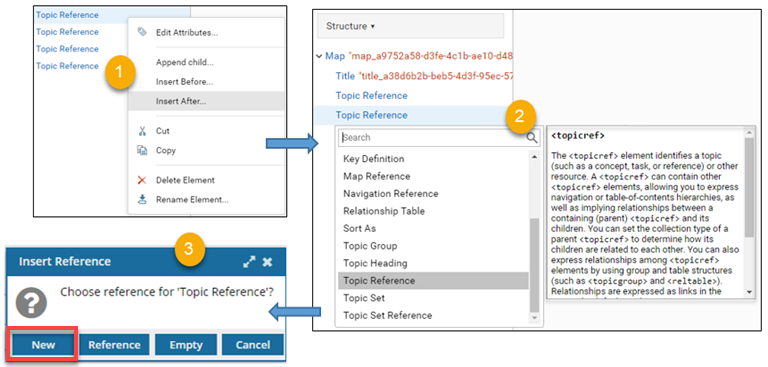

To add a topic that doesn't exist yet:
-
Click
 Components.
-
In the map content pane, place your cursor where you want to insert a reference.
 By default, you see a Display mode of Topic titles.
- You can go to the toolbar and select
 the Display mode option to change the view.
 - If you select View Topic References and leave it on that mode when you save or close the map, the next time you open it, all the references in the map are expanded for you.
- If you select View Topic Content and leave it on that mode when you save or close the map, the next time you open it all the references in the map are collapsed due to memory and performance concerns.
- You can go to the toolbar and select
-
In the toolbar, do one of the following:
- To save your changes locally and keep working, click
 Save .
 - To save your changes to the database and close the map, click
 Save and Submit.
- To save your changes locally and keep working, click